the Open LP db is located:
On Windows 7:
C:\Users\UserName\AppData\Roaming\openlp\data
On Ubuntu:
Sunday, February 02, 2014


Friday, November 08, 2013
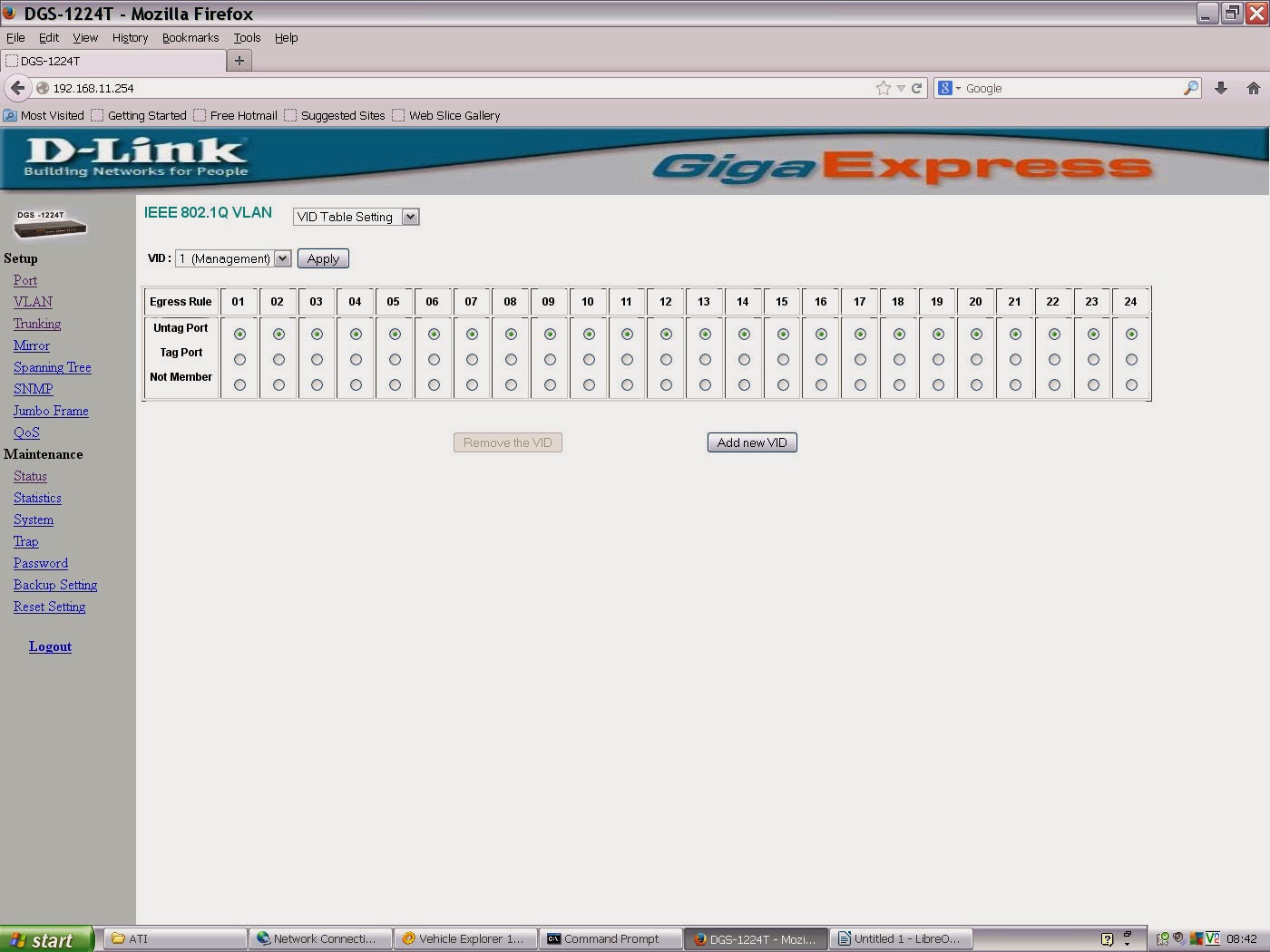
Dlink DGS-1224t switch vlans
OK I think I got the vlans basically doing what I wanted. NEXT, how to tag the vlans so I can trunk two subnets from the cisco AP back to the switch. I wonder if having the DHCP 'feeds' to these two subnets from my router (pfsense) on two physical NICs is going to be possible/sensible. Maybe I need to trunk those two subnets on vlans right from the pfsense router, as well as from the switch to the AP??
I've set port 18 as trunking and made the two vlans overlap on it. hmmm. What's the tagging number?

Part 2.
OK A little progress! With these settings I'm getting IP addresses DHCP'd to a client as I would expect, with the respective DHCP servers plugged into the first port of each vlan group (from the router).

What's the purpose of the management vlan in my case though - if vlan one subnet = the IP address of the device should I dispense with it? Otherwise it just seems to be wasting a port and means I can't get to the device unless I plug into port1??
192.168.11.254 = IP of device
vlan1 = management-lan - cannot be deleted. at least one portVID must be in VID1, i've elft that as port1
vlan11 = dhcp server for 192.168.11.x
vlan21 = dhcp server for 192.168.21.x
vlan31 = dhcp server for 192.168.31.x
Part 1.
What am I doing wrong with this thing?

I assumed that ports 1-12 would give a 192.168.11.x IP, 13-18 a 192.168.21.x address and the last 6 a 192.168.31.x IP, but that isn't happening, bizarly i occasionally get a 192.168.31.x address for a laptop on port 2!



Friday, September 27, 2013
getting bttv cards working for zoneminder
Is the card PAL or NTSC? Cherck the crystals:
The crystal(s) are the small shiny canisters near the large decoder chip. For PAL, this is marked 28.xxxMHz (where xxx are three digits). For NTSC, the canister should bear 35.xxxMHz (again, the xxx are three digits).
The crystal(s) are the small shiny canisters near the large decoder chip. For PAL, this is marked 28.xxxMHz (where xxx are three digits). For NTSC, the canister should bear 35.xxxMHz (again, the xxx are three digits).
Sunday, August 11, 2013
dvb tuner adaptor numbers moving around mythtv
Initially the TBS (DVB_T2 card) loaded as adpators 0 and 1; sometimes (hotboot?) however the Hauppage cards would beat the TBS to it. this of course screws up tuner assignments in mythtv.
Although option 2 (see below) seemed less of a hack i only got option 1 to work:
Option 1: Blacklisting some of the drivers then activating later in boot:
edit this file;
nano /etc/modprobe.d/blacklist.conf
adding
#stop the Hauppauge S2 video card loading before
#TBS T2 card has assigned its adaptor numbers:
blacklist cx8800
blacklist cx8802
blacklist cx88-alsa
then add 'modprobe [the above listed modules]' to the file /etc/rc.local which will be activated a few moments after the TBS drivers have loaded
I have done back up copies of these two files: //server//home/markp/techincal/mythtv for future builds
This shows the names of the modules that are associated with pci hardware:
lspci -vnn
e.g. after compiling the TBS driver (see other posting):
04:00.0 Multimedia controller [0480]: Philips Semiconductors SAA7160 [1131:7160] (rev 03)
Subsystem: Device [6280:0011]
Flags: bus master, fast devsel, latency 0, IRQ 19
Memory at ef000000 (64-bit, non-prefetchable) [size=1M]
Capabilities: [40] MSI: Enable- Count=1/32 Maskable- 64bit+
Capabilities: [50] Express Endpoint, MSI 00
Capabilities: [74] Power Management version 2
Capabilities: [80] Vendor Specific Information: Len=50 <?>
Capabilities: [100] Vendor Specific Information: ID=0000 Rev=0 Len=088 <?>
Kernel driver in use: SAA716x TBS
Kernel modules: saa716x_tbs-dvb
http://ubuntuforums.org/showthread.php?t=1311795&page=2
Option 2: Would this work?
create a /etc/modprobe.d/options-dvb.conf file
# TBS6280 PCI-e DVB-t2
options saa716x_tbs-dvb adapter_nr=0,1
Nope, resulted in only Nova S2 being seen and adaptor no.s v strange
Although option 2 (see below) seemed less of a hack i only got option 1 to work:
Option 1: Blacklisting some of the drivers then activating later in boot:
edit this file;
nano /etc/modprobe.d/blacklist.conf
adding
#stop the Hauppauge S2 video card loading before
#TBS T2 card has assigned its adaptor numbers:
blacklist cx8800
blacklist cx8802
blacklist cx88-alsa
then add 'modprobe [the above listed modules]' to the file /etc/rc.local which will be activated a few moments after the TBS drivers have loaded
#!/bin/sh -e
# rc.local
# This script is executed at the end of each multiuser runlevel.
# Make sure that the script will "exit 0" on success or any other
# value on error.
# In order to enable or disable this script just change the execution
# bits.
# By default this script does nothing.
modprobe cx8800
modprobe cx8802
modprobe cx88-alsa


exit 0
I have done back up copies of these two files: //server//home/markp/techincal/mythtv for future builds
This shows the names of the modules that are associated with pci hardware:
lspci -vnn
e.g. after compiling the TBS driver (see other posting):
04:00.0 Multimedia controller [0480]: Philips Semiconductors SAA7160 [1131:7160] (rev 03)
Subsystem: Device [6280:0011]
Flags: bus master, fast devsel, latency 0, IRQ 19
Memory at ef000000 (64-bit, non-prefetchable) [size=1M]
Capabilities: [40] MSI: Enable- Count=1/32 Maskable- 64bit+
Capabilities: [50] Express Endpoint, MSI 00
Capabilities: [74] Power Management version 2
Capabilities: [80] Vendor Specific Information: Len=50 <?>
Capabilities: [100] Vendor Specific Information: ID=0000 Rev=0 Len=088 <?>
Kernel driver in use: SAA716x TBS
Kernel modules: saa716x_tbs-dvb
http://ubuntuforums.org/showthread.php?t=1311795&page=2
Option 2: Would this work?
create a /etc/modprobe.d/options-dvb.conf file
# TBS6280 PCI-e DVB-t2
options saa716x_tbs-dvb adapter_nr=0,1
Nope, resulted in only Nova S2 being seen and adaptor no.s v strange
Sunday, June 30, 2013
Monday, January 14, 2013
Scanning channels mythtv and mysql notes
One of the issues with (UK based) mythtv is the bewildering set of results you get when doing a channel scan with either freeview of freesat tuners. On freeview in particular now that signals from transmitters are being increased (where analogue is switched off) there is the likelihood that a full channel scan will result in at least two full duplicate sets of channels.
field 'channid' - It's confusing!
Explanation: with my 2x DBV-T and 2x DVB-S tuner setup I have (in theory) four tunings of BBC1, myth knows about all four because firstly, the T and S versions are distinguished by having different 'sourceid'. The 2 x BBC1 within the (eg) T tuner are distiguised by having different 'channid'. (these are made unique during tuning when the channel scanner tells you there is a duplication of channid, myths 'suggestion' of the alternative is how it get's set differently). Myth knows they are both BBC1 because they have the same (prescribed) 'serviceid' SID info comes from the channel scan. BBC1 on freesat and freeview will have different SIDs.
An added complication to this is that the DVB-T tuner can get multiple versions of BBC1 (etc) from different parts of the tuning freq (from weaker TXs further away). This is why the freqid field (unique to DVB-T) is helpful in eliminating those weaker versions of channels (the mysql 'DELETE FROM script above sorts this, but you must know which multiplexes your correct main TXer is using)
The above has resulted in a channel_change.sql text file (in markp/technical/mythtv) containing sql statements for channel configuration of a mythtv setup that contains both dvb-t and dbv-s tuners.
Note that this version of the file is for the Yorkshire (Emley Moor) tv transmitter. change regional BBC and ITV channel accordingly (BBC1 and ITV1).
Need to ensure freesat region variations match the freeview ones:
Which freesat ITV1 channel?? - Emley Moor, my freeview source transmits Yorkshire West, the freesat SID of which is 10160. i have noted some of the regional freesat stations in the file.
fresat SIDs listed here:
http://www.astra2.org/astra1n.html
To bring up the mysql command prompt for the mythtv database:
the statements file can be 'run' from a mysql prompt with the simple command 'source' eg:
The statement file didn't work at first and that was because the first statement which sets all channels to a high number and invisible was commented out. Amended it works well and produces a neat list of channels.
Two other issues now.
1. Am I better using rt-grabber (xmltv) for guide info? probably help if I would like to assign both freeview and freesat channels to the same channum, as some say is possible (the EPG looks much neater then)
2. Should I use same channum for freesat and freeview???
One solution for freeview is to scan only the 'tranports' that you want. This is an option in 'scan configuration' of mythbackend-setup.
but perhaps a neater one (with thanks to http://wiki.stocksy.co.uk/wiki/Tidy_up_MythTV_Channels ) is to always do the full channel scan then simply run this mysql statement, changing the freqid's to match your transmitter:
DELETE FROM channel WHERE (freqid NOT IN (41, 44, 47, 48, 51, 52) AND freqid IS NOT NULL);
You can get the freqid info from here: http://www.ukfree.tv
Determine which TV transmitter you're getting your signal from. My 6 digital multiplexes are: 41, 44, 47, 48, 51, 52
Liskeard update: muxes now: 21, 22, 25, 25, 27, 28, 30, 31, 37
Here's some notes re: the mythconverg mysql database:
The most pertinent table re: ensuring channels get setup up right is 'channel'
I have normally created separate 'sources' (FreeView EIT & FreeSat EIT) for the two types of broadcast (ie DVB-S and DVB-T). In the 'channel' table you can distinguish between DVB-S and T by looking at the sourceid field.
field 'channum' is the channel number used by mythtv in the epg and live TV etc.
Liskeard update: muxes now: 21, 22, 25, 25, 27, 28, 30, 31, 37
Here's some notes re: the mythconverg mysql database:
The most pertinent table re: ensuring channels get setup up right is 'channel'
I have normally created separate 'sources' (FreeView EIT & FreeSat EIT) for the two types of broadcast (ie DVB-S and DVB-T). In the 'channel' table you can distinguish between DVB-S and T by looking at the sourceid field.
UPDATE channel SET channum=101, visible=1, xmltvid="west-midlands.bbc1.bbc.co.uk" WHERE sourceid="2" AND serviceid="10301"; #'BBC 1 West Midlands';
field 'channum' is the channel number used by mythtv in the epg and live TV etc.
field 'channid' - It's confusing!
Explanation: with my 2x DBV-T and 2x DVB-S tuner setup I have (in theory) four tunings of BBC1, myth knows about all four because firstly, the T and S versions are distinguished by having different 'sourceid'. The 2 x BBC1 within the (eg) T tuner are distiguised by having different 'channid'. (these are made unique during tuning when the channel scanner tells you there is a duplication of channid, myths 'suggestion' of the alternative is how it get's set differently). Myth knows they are both BBC1 because they have the same (prescribed) 'serviceid' SID info comes from the channel scan. BBC1 on freesat and freeview will have different SIDs.
An added complication to this is that the DVB-T tuner can get multiple versions of BBC1 (etc) from different parts of the tuning freq (from weaker TXs further away). This is why the freqid field (unique to DVB-T) is helpful in eliminating those weaker versions of channels (the mysql 'DELETE FROM script above sorts this, but you must know which multiplexes your correct main TXer is using)
The above has resulted in a channel_change.sql text file (in markp/technical/mythtv) containing sql statements for channel configuration of a mythtv setup that contains both dvb-t and dbv-s tuners.
Note that this version of the file is for the Yorkshire (Emley Moor) tv transmitter. change regional BBC and ITV channel accordingly (BBC1 and ITV1).
Need to ensure freesat region variations match the freeview ones:
Which freesat ITV1 channel?? - Emley Moor, my freeview source transmits Yorkshire West, the freesat SID of which is 10160. i have noted some of the regional freesat stations in the file.
fresat SIDs listed here:
http://www.astra2.org/astra1n.html
To bring up the mysql command prompt for the mythtv database:
mysql -u root -p mythconverg;the statements file can be 'run' from a mysql prompt with the simple command 'source' eg:
mysql> source /path/to/file/channel_change.sqlThe statement file didn't work at first and that was because the first statement which sets all channels to a high number and invisible was commented out. Amended it works well and produces a neat list of channels.
Two other issues now.
1. Am I better using rt-grabber (xmltv) for guide info? probably help if I would like to assign both freeview and freesat channels to the same channum, as some say is possible (the EPG looks much neater then)
2. Should I use same channum for freesat and freeview???
Sunday, January 13, 2013
DVB-T2 in mytht tv using TBS6280
The TBS 6280 is a dual tuner DVB-T2 card, it has HD freeview ability.
To make it work:
Download the latest version of the driver from the TBS site
wget http://www.tbsdtv.com/download/document/common/tbs-linux-drivers_v130506.zip
mkdir tbs-linux-drivers_v130506
cd tbs-linux-drivers_v130506
unzip ../tbs-linux-drivers_v130506.zip
1 extract linux-tbs-drivers.tar.bz2 archive:
# tar xjvf linux-tbs-drivers.tar.bz22 go to driver package directory:
# cd linux-tbs-drivers3 depending on your kernel version and if the kernel is x86 or
x86_64 (check output of 'uname -a') do:
- for x86 kernel 3.x (x86 32 bit installations of kernel 3.x):
# ./v4l/tbs-x86_r3.sh- for x86 kernel 2.6.x (x86 32 bit installations of kernel 2.6.x):
# ./v4l/tbs-x86.sh- for any x86_64 kernel (x86 64 bit installations of Linux):
# ./v4l/tbs-x86_64.sh4 build and install the driver:
# make && make install5 reboot in order to load the newly installed driver:
# shutdown -r now6 after reboot check that the newly installed driver is loaded correctly:
# dmesg | grep frontendOR - follow the instructions from the v4l website:
http://linuxtv.org/wiki/index.php/TBS6280#Re-installing_after_a_kernel_upgradeDon't forget the driver will need building again if the kernel gets updated.
I'm going to prevent kernel updates automatically on this machine so that I don't find the TBS card isn't working one day: set that up using this guide:
http://askubuntu.com/questions/178324/how-to-skip-kernel-update
Subscribe to:
Posts (Atom)