Friday, March 24, 2017
Video editing DVD making 2017 notes
For Capture: from DV cam, using firewire - Kino
For editing: OpenShot. Export edited clips as dvd files for DVDStyler, perhaps as .mov?
For DVD Menu creation and burning: DVDStyler. Use DVD-R's


Friday, August 07, 2015
To do a mailmerge: Updated instructions from Older posting
(Instructions of Aug 2015 using LibreOffice 4.4)
1. Use any spreadsheet as data source. Register it (ie make it available in the 'Mail Merge Wizard' of Writer (under Tools -->))
Use Writers 'Address Data Source' (File --> Wizards). Don't use spaces in spreadsheet name. Make first line in spreadsheet the titles of the columns.
2. Prep a document. Insert mailmerge fields using: Insert--> Fields --> More fields --> Database --> Mail Merge Fields --> spreadhseet/sheet1 should be listed.
3. To suppress blank fields (per line), view 'printing characters' and change the carriage returns at end of lines for P (paragraphs), if not already. Then, with the cursor at the end of the relevant line: Insert--> fields--> more fields-->functions-->hidden paragraph]. In the 'condition' field in the dialogue: reference the spreadsheet column involved: use a '!' (this means 'NOT') eg ![addresses1.Sheet1.Addressline2]
4. After this the Mail Merge Wizard brings you to step 8. Save the merged document as a single file. Upon 'saving' the merged document (behind the dialogue) seems to disappear. The saved merged file will be there, but there's also another version 'untitled1.odt' etc lurking behind other things. I think this might be a glitch, but doesn't really matter - just confusing.
5. my other blog post has a link to how to suppress a field placed within a line with other fields (eg no 'salutation' being listed in the spreadsheet).
As far as I know, OOo has no way to insert a database field only if it isn't empty. Instead, I think the trick is to insert the [middlename] field always, and then insert a conditional space if the field is not empty. If the field is empty, then you don't need the space.
You can try something like this:
1) View > Data Sources; select your table or query so that the data grid is filled in and active.
2) Insert > Fields > Other > Functions, Type: Conditional text
3) Drag the [middlename] column head from the data grid into the fields dialog, and drop it in the Condition entry. It should end up looking something like: [database.table.middlename].
4) Add text after the field to complete the condition: [database.table.middlename] neq ""
5) Enter a space in the "Then" entry. Leave the "Else" entry empty.
6) Click "Insert" and then "Close"
I think the above uses the same approach as for blank lines but replaces the blank paragraph with blank text. The slightly different approach used in the 'condition' field ie using neq "" instead of ! may be achieve the same end result, but have tested on this occasion - that'll be Christmas letter time!
1. Use any spreadsheet as data source. Register it (ie make it available in the 'Mail Merge Wizard' of Writer (under Tools -->))
Use Writers 'Address Data Source' (File --> Wizards). Don't use spaces in spreadsheet name. Make first line in spreadsheet the titles of the columns.
2. Prep a document. Insert mailmerge fields using: Insert--> Fields --> More fields --> Database --> Mail Merge Fields --> spreadhseet/sheet1 should be listed.
3. To suppress blank fields (per line), view 'printing characters' and change the carriage returns at end of lines for P (paragraphs), if not already. Then, with the cursor at the end of the relevant line: Insert--> fields--> more fields-->functions-->hidden paragraph]. In the 'condition' field in the dialogue: reference the spreadsheet column involved: use a '!' (this means 'NOT') eg ![addresses1.Sheet1.Addressline2]
4. After this the Mail Merge Wizard brings you to step 8. Save the merged document as a single file. Upon 'saving' the merged document (behind the dialogue) seems to disappear. The saved merged file will be there, but there's also another version 'untitled1.odt' etc lurking behind other things. I think this might be a glitch, but doesn't really matter - just confusing.
5. my other blog post has a link to how to suppress a field placed within a line with other fields (eg no 'salutation' being listed in the spreadsheet).
As far as I know, OOo has no way to insert a database field only if it isn't empty. Instead, I think the trick is to insert the [middlename] field always, and then insert a conditional space if the field is not empty. If the field is empty, then you don't need the space.
You can try something like this:
1) View > Data Sources; select your table or query so that the data grid is filled in and active.
2) Insert > Fields > Other > Functions, Type: Conditional text
3) Drag the [middlename] column head from the data grid into the fields dialog, and drop it in the Condition entry. It should end up looking something like: [database.table.middlename].
4) Add text after the field to complete the condition: [database.table.middlename] neq ""
5) Enter a space in the "Then" entry. Leave the "Else" entry empty.
6) Click "Insert" and then "Close"
I think the above uses the same approach as for blank lines but replaces the blank paragraph with blank text. The slightly different approach used in the 'condition' field ie using neq "" instead of ! may be achieve the same end result, but have tested on this occasion - that'll be Christmas letter time!
Wednesday, July 29, 2015
Model A Spark Plugs
Good discussion of the issues re: sparkplugs here
I initially had the autolite 386's which IS a resistor spark plug (not good for magneto according to some).
Recently, at the recommend of the guy who got the tractor going summer 2014 I put in Champion D16
I initially had the autolite 386's which IS a resistor spark plug (not good for magneto according to some).
Recently, at the recommend of the guy who got the tractor going summer 2014 I put in Champion D16
Friday, February 20, 2015
dd wrt on cisoc e1000 both version 2 and 2.1
as of 15/2/2014 dd wrt db recommends build version 21061, a special version needed for first flash:
http://www.dd-wrt.com/site/support/router-database search: e1000
Will check the vlan setup both before and after as phuzi0n makes the following (possibly important) point about the vlans on this device:
http://www.dd-wrt.com/phpBB2/viewtopic.php?p=607698#607698
vlan trunking/tagging confirmed working on Linksys (cisco) e1000 routers (both v2 and v2.1) using dd-wrt.v24-21061_NEWD-2_K2.6_mini_e1000v2 (latest recommend from the database).
I've been faffing around with these routers for months now, trying to get them working as Wifi APs that have multiple WLANs and then trunking the subnets using tagging to my vlan capable switch over a single port/cable. I am using pfsense as a DHCP server for all subnets. I am trying to give wifi coverage in a large community building and want to provide both in-house and guest wifi facilities. I went for these routers as I read in the forum they should work and I've only paid between £6 and £15 each for all three, in nearly new condition.
It's probably because I'm a bit of a novice but despite the huge number of how-to's on this forum, it seemed quite a challenge, this post attempts to explain to other novices what foxed me for so long, because I'VE GOT IT WORKING! It's partly to do with the vagaries of this particular hardware.
Most of these things I've learned very slowly are actually clearly stated by phuzi0n in one place or another
1. Don't assume the gui works for the vlans as I did. As of Feb 2014 the gui will not set the vlans using the above version. I think I assumed that as most of the posts I was reading were four years old that this might have been sorted. Bad assumption. Don't fear the command line approach using telnet, it wasn't too hard.
2. Don't get confused about which (internal) vlans are used on this device. Most 100mbps router/switches normally default to 0 and 1 for the lan and wan. Gigabit router/switches normally use 1 and 2. I was seriously confused with the fact that on initiation vlans 0, 1 and 2 show on this device. These int. vlans use 1&2 as per gigabit, BUT they are only gigabit within the Chip, external ports run at 100mbps. Don't know why vlan 0 shows up but it well confused me. Eko and LOM explain the way this chip is deployed in this instance here: http://www.dd-wrt.com/phpBB2/viewtopic.php?p=595874#595874 . Ignore references to vlan0.
3. I was confused about how to set the DHCP serving for the two WLANS, which I wanted to come from my pfsense router. In the end I simply set a static IP for each of the two bridges that I created for the WLANS and found that the DHCP server was used by the clients. The confusing bit was what to do with the DHCP settings on the main gui setup page. I just left it as DHCP server and it didn't cause a problem. From the vlan settings below you'll see I had three subnets, I kept vlan1 as a management subnet bridged to the lan (as default). vlans 12 and 13 were for the two WLANS. I didn't have a problem using the WAN port for the trunking port, as some suggest can happen.
Default settings after flashing:
root@DD-WRT:~# nvram show | grep vlan.*ports | sort
size: 24854 bytes (7914 left)
vlan0ports=1 2 3 4 5*
vlan1ports=1 2 3 4 5*
vlan2ports=0 5
nvram show | grep port.*vlans
root@DD-WRT:~# nvram show | grep port.*vlans | sort
size: 24854 bytes (7914 left)
port0vlans=1
port1vlans=0
port2vlans=0
port3vlans=0
port4vlans=0
port5vlans=0 1 16
root@DD-WRT:~# nvram show | grep vlan.*hwname
vlan2hwname=et0
vlan1hwname=et0
vlan0hwname=et0
I took examples from the switchports wiki page and amended them:
This one will:
1. make the wan port a trunked port for vlans 1,12,13 (all tagged vlans)
2. make ports 1 and 2 untagged ports for vlan1
3. make ports 3 and 4 untagged ports for vlan12
Looks OK:
root@DD-WRT:~# nvram show | grep vlan.*ports | sort
size: 19228 bytes (13540 left)
vlan0ports=1 2 3 4 5*
vlan12ports=0t 3 4 5
vlan13ports=0t 5
vlan1ports=0t 1 2 5*
vlan2ports=0 5
root@DD-WRT:~# nvram show | grep port.*vlans | sort
size: 19228 bytes (13540 left)
port0vlans=1 12 13 16 18 19
port1vlans=1 18 19
port2vlans=1 18 19
port3vlans=12 18 19
port4vlans=12 18 19
port5vlans=1 12 13 16
This one will:
1. make the wan a trunked port for vlans 1,12,13 (all tagged vlans)
2. make ports 1, 2, 3 and 4 untagged ports for vlan1
1. make the wan port and port1 trunked ports for vlans 1,12,13 (all tagged vlans)
2. make port 2 an untagged port for vlan1
3. make ports 3 and 4 untagged ports for vlan12
http://www.dd-wrt.com/site/support/router-database search: e1000
Will check the vlan setup both before and after as phuzi0n makes the following (possibly important) point about the vlans on this device:
http://www.dd-wrt.com/phpBB2/viewtopic.php?p=607698#607698
vlan trunking/tagging confirmed working on Linksys (cisco) e1000 routers (both v2 and v2.1) using dd-wrt.v24-21061_NEWD-2_K2.6_mini_e1000v2 (latest recommend from the database).
I've been faffing around with these routers for months now, trying to get them working as Wifi APs that have multiple WLANs and then trunking the subnets using tagging to my vlan capable switch over a single port/cable. I am using pfsense as a DHCP server for all subnets. I am trying to give wifi coverage in a large community building and want to provide both in-house and guest wifi facilities. I went for these routers as I read in the forum they should work and I've only paid between £6 and £15 each for all three, in nearly new condition.
It's probably because I'm a bit of a novice but despite the huge number of how-to's on this forum, it seemed quite a challenge, this post attempts to explain to other novices what foxed me for so long, because I'VE GOT IT WORKING! It's partly to do with the vagaries of this particular hardware.
Most of these things I've learned very slowly are actually clearly stated by phuzi0n in one place or another
1. Don't assume the gui works for the vlans as I did. As of Feb 2014 the gui will not set the vlans using the above version. I think I assumed that as most of the posts I was reading were four years old that this might have been sorted. Bad assumption. Don't fear the command line approach using telnet, it wasn't too hard.
2. Don't get confused about which (internal) vlans are used on this device. Most 100mbps router/switches normally default to 0 and 1 for the lan and wan. Gigabit router/switches normally use 1 and 2. I was seriously confused with the fact that on initiation vlans 0, 1 and 2 show on this device. These int. vlans use 1&2 as per gigabit, BUT they are only gigabit within the Chip, external ports run at 100mbps. Don't know why vlan 0 shows up but it well confused me. Eko and LOM explain the way this chip is deployed in this instance here: http://www.dd-wrt.com/phpBB2/viewtopic.php?p=595874#595874 . Ignore references to vlan0.
3. I was confused about how to set the DHCP serving for the two WLANS, which I wanted to come from my pfsense router. In the end I simply set a static IP for each of the two bridges that I created for the WLANS and found that the DHCP server was used by the clients. The confusing bit was what to do with the DHCP settings on the main gui setup page. I just left it as DHCP server and it didn't cause a problem. From the vlan settings below you'll see I had three subnets, I kept vlan1 as a management subnet bridged to the lan (as default). vlans 12 and 13 were for the two WLANS. I didn't have a problem using the WAN port for the trunking port, as some suggest can happen.
Default settings after flashing:
root@DD-WRT:~# nvram show | grep vlan.*ports | sort
size: 24854 bytes (7914 left)
vlan0ports=1 2 3 4 5*
vlan1ports=1 2 3 4 5*
vlan2ports=0 5
nvram show | grep port.*vlans
root@DD-WRT:~# nvram show | grep port.*vlans | sort
size: 24854 bytes (7914 left)
port0vlans=1
port1vlans=0
port2vlans=0
port3vlans=0
port4vlans=0
port5vlans=0 1 16
root@DD-WRT:~# nvram show | grep vlan.*hwname
vlan2hwname=et0
vlan1hwname=et0
vlan0hwname=et0
I took examples from the switchports wiki page and amended them:
This one will:
1. make the wan port a trunked port for vlans 1,12,13 (all tagged vlans)
2. make ports 1 and 2 untagged ports for vlan1
3. make ports 3 and 4 untagged ports for vlan12
nvram set vlan1ports="0t 1 2 5*"
nvram set vlan12ports="0t 3 4 5"
nvram set vlan13ports="0t 5"
nvram set port0vlans="1 12 13 16 18 19"
nvram set port1vlans="1 18 19"
nvram set port2vlans="1 18 19"
nvram set port3vlans="12 18 19"
nvram set port4vlans="12 18 19"
nvram set port5vlans="1 12 13 16"
nvram set vlan1hwname=et0
nvram set vlan12hwname=et0
nvram set vlan13hwname=et0
nvram commit
reboot
Looks OK:
root@DD-WRT:~# nvram show | grep vlan.*ports | sort
size: 19228 bytes (13540 left)
vlan0ports=1 2 3 4 5*
vlan12ports=0t 3 4 5
vlan13ports=0t 5
vlan1ports=0t 1 2 5*
vlan2ports=0 5
root@DD-WRT:~# nvram show | grep port.*vlans | sort
size: 19228 bytes (13540 left)
port0vlans=1 12 13 16 18 19
port1vlans=1 18 19
port2vlans=1 18 19
port3vlans=12 18 19
port4vlans=12 18 19
port5vlans=1 12 13 16
This one will:
1. make the wan a trunked port for vlans 1,12,13 (all tagged vlans)
2. make ports 1, 2, 3 and 4 untagged ports for vlan1
nvram set vlan1ports="0t 1 2 3 4 5*"
nvram set vlan12ports="0t 5"
nvram set vlan13ports="0t 5"
nvram set port0vlans="1 12 13 16 18 19"
nvram set port1vlans="1 18 19"
nvram set port2vlans="1 18 19"
nvram set port3vlans="1 18 19"
nvram set port4vlans="1 18 19"
nvram set port5vlans="1 12 13 16"
nvram set vlan1hwname=et0
nvram set vlan12hwname=et0
nvram set vlan13hwname=et0
nvram commit
reboot
To setup further E1000's using duplicate settings as above (obviously changing IP addresses as necessary) I tried using the GUIs backup facility; for whatever reason it failed to insert all the ports in the correct vlans, although it did do some of them?
This one will:
1. make the wan port and port1 trunked ports for vlans 1,12,13 (all tagged vlans)
2. make port 2 an untagged port for vlan1
3. make ports 3 and 4 untagged ports for vlan12
nvram set vlan1ports="0t 1t 2 5*"
nvram set vlan12ports="0t 1t 3 4 5"
nvram set vlan13ports="0t 1t 5"
nvram set port0vlans="1 12 13 16 18 19"
nvram set port1vlans="1 12 13 16 18 19"
nvram set port2vlans="1 18 19"
nvram set port3vlans="12 18 19"
nvram set port4vlans="12 18 19"
nvram set port5vlans="1 12 13 16"
nvram set vlan1hwname=et0
nvram set vlan12hwname=et0
nvram set vlan13hwname=et0
nvram commit
reboot
UPDATE: Feb 2015. I have used four of these as described in the setup above and they have proved faultless in production! I never even have to reboot them. I'm now trying to deploy e2000's (with the gigabit switches - also cheap on ebay) in the same way - have already bricked my first one!
Friday, December 26, 2014
mythtv tweaks dec 2014
1.
mythlounge with ubuntu 14.04 shows xfce4-panel (menu bar) in top:
panel properties:
choose: 'Automatically Show and Hide the panel' and ' Don't reserve space on borders'
2.
Shutdown and reboot commands no longer work in mythtv. Edit sudoer's list
sudo visudo to edit the file:
user_name ALL=(ALL) NOPASSWD: /sbin/poweroff, /sbin/reboot, /sbin/shutdown
See also http://askubuntu.com/questions/168879/shutdown-from-terminal-without-entering-password
Above makes reboot, but not shutdown work?
Adding 'sudo poweroff' to custom halt command in mythtv--->setup--->general sorts this.
Tip:
have a look at frontend logs whilst using:
3.
x11vnc not working from startup:
4.
dvd drive not working within mythtv:
in frontend playback settings specify location of dvd drive:
/dev/sr0
5.
Get Airplay working:
probably gonna need to have mythboxes and wifi on same subnet for this.
6. Fine tuning of mythsunroom:
nvidia overscan settings=50
mythfrontend gui doesn't resize: adjust pixels of gui in settings: appearance to 1831x1031
x11vnc from startup:
http://robot.wpi.edu/wiki/index.php/Setting_up_an_XUbuntu_VNC_Server#Automatically_start_the_server
mythlounge with ubuntu 14.04 shows xfce4-panel (menu bar) in top:
panel properties:
choose: 'Automatically Show and Hide the panel' and ' Don't reserve space on borders'
2.
Shutdown and reboot commands no longer work in mythtv. Edit sudoer's list
sudo visudo to edit the file:
user_name ALL=(ALL) NOPASSWD: /sbin/poweroff, /sbin/reboot, /sbin/shutdown
See also http://askubuntu.com/questions/168879/shutdown-from-terminal-without-entering-password
Above makes reboot, but not shutdown work?
Adding 'sudo poweroff' to custom halt command in mythtv--->setup--->general sorts this.
Tip:
have a look at frontend logs whilst using:
tail -f /var/log/mythtv/mythfrontend.log
3.
x11vnc not working from startup:
4.
dvd drive not working within mythtv:
in frontend playback settings specify location of dvd drive:
/dev/sr0
5.
Get Airplay working:
probably gonna need to have mythboxes and wifi on same subnet for this.
6. Fine tuning of mythsunroom:
nvidia overscan settings=50
mythfrontend gui doesn't resize: adjust pixels of gui in settings: appearance to 1831x1031
x11vnc from startup:
http://robot.wpi.edu/wiki/index.php/Setting_up_an_XUbuntu_VNC_Server#Automatically_start_the_server
Sunday, December 14, 2014
mythserver rebuild dec 2014 - Completed!
Purpose: try to get new mythserver done by Christmas!
Current issues with present server:
live tv has to be 'recorded' not to crash
mythweb not working
mythbackend flaky and not autostarting
grub issue - only boots on hot reboot
Installed mythbunutu 14.04 64bit on 160gb drive; something about the ISOs now means that some m'board BIOS won't boot form the disks. Using pendrive instead. mythserver boots fine from it.
recordings (etc) live at: /var/lib/mythtv/ on their own separate 1tb drive.
Using rsync to copy recordings from old var to new one (temp mounted on old machine):
sudo rsync -a --progress /var/lib/mythtv/recordings/* /media/a0907e07-74fe-4bdb-b2b3-c6bf2ae58ab1/lib/mythtv/recordings/
backup mythtv using:
markp@mythserver:~$ sudo /usr/share/mythtv/mythconverg_backup.pl --verbose
this creates a sql backup file in /home/mythtv
copy it to the temp /var (on the new system db_backups is by default the place for the backups)
the following is supposed to change the location of the backup. can't see how it works.
copy the backups to what will be the new /var:
sudo rsync -a --progress /home/mythtv/*.gz /media/a0907e07-74fe-4bdb-b2b3-c6bf2ae58ab1/lib/mythtv/db_backups/
New server - tweaks and issues:
After installing the proprietary TBS drivers (not the new Opensource ones) the Hauppage cards are not seen.
The 'make' has probably caused an issue with the existingdrivers. The TBS forum advises: "You've got some old modules mixed in with the new ones".
sudo mv /lib/modules/$(uname -r)/kernel/drivers/media ~/media.bak
cd to where I unpacked the TBS drivers ( /home/markp/Downloads/tbsdrivers/linux-tbs-drivers/ )and remake:
sudo make install
sudo reboot
Trying to restore:
markp@mythserver:/usr/share/mythtv$ sudo ./mythconverg_restore.pl --verbose
don't know why when I used the backup regime the ./ wasn't needed, restore needs it? Yes.
Remote Frontends can't connect:
Edit /etc/mysql/conf.d/mythtv.cnf
remove the hash from the "bind-address 0.0.0.0" line
Now working.
Backend runs out of disk space after a few days. Probably an issue with permissions in /var/lib/mythtv/ as previous mythbackend had to run as root.
chown to mythtv:mythtv and chmod to 666 in both recordings and livetv folders. probably everything in here should be owned by mythtv.
Current issues with present server:
live tv has to be 'recorded' not to crash
mythweb not working
mythbackend flaky and not autostarting
grub issue - only boots on hot reboot
Installed mythbunutu 14.04 64bit on 160gb drive; something about the ISOs now means that some m'board BIOS won't boot form the disks. Using pendrive instead. mythserver boots fine from it.
recordings (etc) live at: /var/lib/mythtv/ on their own separate 1tb drive.
Using rsync to copy recordings from old var to new one (temp mounted on old machine):
sudo rsync -a --progress /var/lib/mythtv/recordings/* /media/a0907e07-74fe-4bdb-b2b3-c6bf2ae58ab1/lib/mythtv/recordings/
backup mythtv using:
markp@mythserver:~$ sudo /usr/share/mythtv/mythconverg_backup.pl --verbose
this creates a sql backup file in /home/mythtv
copy it to the temp /var (on the new system db_backups is by default the place for the backups)
the following is supposed to change the location of the backup. can't see how it works.
echo "DBBackupDirectory=/home/mythtv" > /var/lib/mythtv/db_backups
copy the backups to what will be the new /var:
sudo rsync -a --progress /home/mythtv/*.gz /media/a0907e07-74fe-4bdb-b2b3-c6bf2ae58ab1/lib/mythtv/db_backups/
New server - tweaks and issues:
After installing the proprietary TBS drivers (not the new Opensource ones) the Hauppage cards are not seen.
The 'make' has probably caused an issue with the existingdrivers. The TBS forum advises: "You've got some old modules mixed in with the new ones".
sudo mv /lib/modules/$(uname -r)/kernel/drivers/media ~/media.bak
cd to where I unpacked the TBS drivers ( /home/markp/Downloads/tbsdrivers/linux-tbs-drivers/ )and remake:
sudo make install
sudo reboot
Trying to restore:
markp@mythserver:/usr/share/mythtv$ sudo ./mythconverg_restore.pl --verbose
--drop_database --create_database --directory /var/lib/mythtv/db_backups --filename mythconverg-1317-20141215131639.sql.gz
don't know why when I used the backup regime the ./ wasn't needed, restore needs it? Yes.
Remote Frontends can't connect:
Edit /etc/mysql/conf.d/mythtv.cnf
remove the hash from the "bind-address 0.0.0.0" line
Now working.
Backend runs out of disk space after a few days. Probably an issue with permissions in /var/lib/mythtv/ as previous mythbackend had to run as root.
chown to mythtv:mythtv and chmod to 666 in both recordings and livetv folders. probably everything in here should be owned by mythtv.
John Deere Model A spluttering
Note about the throttle linkage to the govenor: The linkage needs to be "1/2 a hole short", i.e. when the throttle is
wide open, engine stopped, take the linkage out of the arm on the carb.
The gov. spring should pull the linkage 1/2 of the hole dia. past the
point where it will go in. There are no springs inside the gov. housing,
about all that can happen in there is a thrown weight or the sleeve
stuck from sitting.
from here:
http://www.smokstak.com/forum/showthread.php?t=22799
from here:
http://www.smokstak.com/forum/showthread.php?t=22799
Friday, May 16, 2014
charity software - methodist charities
In summer 2013 I realised that the free 'google apps non-profits', after much UK lobbying for many years, is now available for UK Registered Charities. This is a great offer, for the facility it provides, costs serious money for businesses. I have successfully applied for and set this up for our Methodist Circuit. If you have dreams of using ICT effectively in your Circuit or Church and want to know what it can do, message me. In a nutshell it's key features are: secure document/creation and sharing; shared calendars for colleagues and (potentially) a common address book (this needs work to make happen which I haven't been able to achieve yet); a shared Circuit-wide addressbook for email and directory creation has always been a bit of a holy grail for me! Got this sorted already - for free?? Let me know how!
Just recently I've investigated TT-Exchange, which offers donated software from several noteworthy firms, including microsoft, to UK Charities. Yesterday it was confirmed that our Circuit does qualify for some, if not all of the software, but importantly it includes the MS stuff. I think this means for an 'administration donation' we can get licences for Windows 8 OS for about £5, and Office 2013 Standard for £15. I will confirm in the future if this is true!
Just recently I've investigated TT-Exchange, which offers donated software from several noteworthy firms, including microsoft, to UK Charities. Yesterday it was confirmed that our Circuit does qualify for some, if not all of the software, but importantly it includes the MS stuff. I think this means for an 'administration donation' we can get licences for Windows 8 OS for about £5, and Office 2013 Standard for £15. I will confirm in the future if this is true!
Wednesday, May 14, 2014
public wifi
Public wifi from church premises
When it comes to Safeguarding one area of protection and care that the church should not overlook is if it offers wifi facilities for the public from church premises.
There are good reasons why such provision can be positive and helpful. Increasingly the Church seeks to engage with the community around it by offering the church premises for a wider variety of uses. Using the premises for things such as conferences and training, are more attractive if providing an online facility, especially if your church premises have little or no 3G mobile phone broadband signal. Offering public wifi at a church raises two particular challenges: controlling who has access and controlling the content public users might use.
Controlling who has access - Providing wifi in a public arena, such as church premises, must be understood as fundamentally different from a domestic wifi scenario. One reason for this is that offering wifi safely to occasional/infrequent unknown users requires security approaches that are not needed in the domestic situation. A fixed wifi password which must be revealed to the wifi user, if distributed widely, leaves the wifi facility totally open to misuse and abuse. However systems which can give some level of control to the free wifi access must not be so complex that they become unattractive to either use, or administrate.
Controlling the content - Public wifi access is attractive to rogue internet users who might like to either download, or upload, illegal, illicit and pornogrpahic content. Assuming such a user makes an internet connection with their own wifi device, once they have disconnected and removed themselves from the physical location of the wifi hotspot, their is no way to trace who that person was.
Solutions
For every problem there are solutions and there are software and hardware tools which can, and I suggest should, be deployed by churches to ensure that the abuse and misuse of their wifi facilities is minimised as much as possible, this is not least for their own protection; there are serious legal and criminal ramifications of certain types of internet traffic being passed through a church broadband connection.
Controlling access - To control who can use the wifi a system which uses timed vouchers is a reasonable solution. Firstly such systems require users to present themselves to someone inhouse to obtain the voucher, which can be limited to only work for (eg) 4 hours. Each user voucher uses a code or password which is unique, not generic.
Controlling content - To ensure that inappropriate material is not passed through the Church broadband connection a content filtering system should be deployed. Although such systems require some management, they are essential to try and block and filter inappropriate internet traffic of guest users.
Deploying such a solution?
Such systems typically work by replacing the broadband router provided by the ISP with something more sophisticated. Such approaches need not be prohibitively expensive, especially if there are local people who can help with the setup and administration of the systems.
Some very worthwhile solutions which are free are available using opensource software-based routers. pfSense is an excellent example of an opensource solution which can provide all of the above; it provides many professional features. Although such software is free to download and use it will need to be run on a dedicated PC. Ideally special PC hardware which has a very low power requirement is used. Such hardware can cost less than £200; if that breaks the budget pfsense can be run on a redundant PC which might cost next to nothing.
Other considerations?
Do you have extensive premises? If so one wifi access point (AP) might not cover all the premises, additional APs will be required. pfSense and solutions like it use a 'firewall' which provides robust security between different parts of the Church network, eg the church office. pfSense also has the ability to setup two (or more) wifi networks, one for trusted 'in house' connections and one for 'public' users. Separating these networks helps maintain network security; it does though add to the complexity of the setup. Carefully chosen AP hardware can broadcast both networks simultaneously, saving on hardware and power costs.
If you'd like to know more about deploying such systems post a comment or you contact me at: mark.pengelly AT methodist.org.uk
When it comes to Safeguarding one area of protection and care that the church should not overlook is if it offers wifi facilities for the public from church premises.
There are good reasons why such provision can be positive and helpful. Increasingly the Church seeks to engage with the community around it by offering the church premises for a wider variety of uses. Using the premises for things such as conferences and training, are more attractive if providing an online facility, especially if your church premises have little or no 3G mobile phone broadband signal. Offering public wifi at a church raises two particular challenges: controlling who has access and controlling the content public users might use.
Controlling who has access - Providing wifi in a public arena, such as church premises, must be understood as fundamentally different from a domestic wifi scenario. One reason for this is that offering wifi safely to occasional/infrequent unknown users requires security approaches that are not needed in the domestic situation. A fixed wifi password which must be revealed to the wifi user, if distributed widely, leaves the wifi facility totally open to misuse and abuse. However systems which can give some level of control to the free wifi access must not be so complex that they become unattractive to either use, or administrate.
Controlling the content - Public wifi access is attractive to rogue internet users who might like to either download, or upload, illegal, illicit and pornogrpahic content. Assuming such a user makes an internet connection with their own wifi device, once they have disconnected and removed themselves from the physical location of the wifi hotspot, their is no way to trace who that person was.
Solutions
For every problem there are solutions and there are software and hardware tools which can, and I suggest should, be deployed by churches to ensure that the abuse and misuse of their wifi facilities is minimised as much as possible, this is not least for their own protection; there are serious legal and criminal ramifications of certain types of internet traffic being passed through a church broadband connection.
Controlling access - To control who can use the wifi a system which uses timed vouchers is a reasonable solution. Firstly such systems require users to present themselves to someone inhouse to obtain the voucher, which can be limited to only work for (eg) 4 hours. Each user voucher uses a code or password which is unique, not generic.
Controlling content - To ensure that inappropriate material is not passed through the Church broadband connection a content filtering system should be deployed. Although such systems require some management, they are essential to try and block and filter inappropriate internet traffic of guest users.
Deploying such a solution?
Such systems typically work by replacing the broadband router provided by the ISP with something more sophisticated. Such approaches need not be prohibitively expensive, especially if there are local people who can help with the setup and administration of the systems.
Some very worthwhile solutions which are free are available using opensource software-based routers. pfSense is an excellent example of an opensource solution which can provide all of the above; it provides many professional features. Although such software is free to download and use it will need to be run on a dedicated PC. Ideally special PC hardware which has a very low power requirement is used. Such hardware can cost less than £200; if that breaks the budget pfsense can be run on a redundant PC which might cost next to nothing.
Other considerations?
Do you have extensive premises? If so one wifi access point (AP) might not cover all the premises, additional APs will be required. pfSense and solutions like it use a 'firewall' which provides robust security between different parts of the Church network, eg the church office. pfSense also has the ability to setup two (or more) wifi networks, one for trusted 'in house' connections and one for 'public' users. Separating these networks helps maintain network security; it does though add to the complexity of the setup. Carefully chosen AP hardware can broadcast both networks simultaneously, saving on hardware and power costs.
If you'd like to know more about deploying such systems post a comment or you contact me at: mark.pengelly AT methodist.org.uk
Tuesday, April 22, 2014
mythtv upgrade April 2014
Current issues:
grub problem, require hot reboot to make grub load?
channels not quite right.
Current setup:
mythtv .2
mythbackend doesn't autostart at present
1Tb drive has 200Gb / and 800 Gb /var partitions
(recordings are at /var/lib/mythtv/recordings)
<code>
markp@mythserver:~$ apt-cache policy mythtv
mythtv:
Installed: 2:0.26.1+fixes.20131223.e41b710-0ubuntu0mythbuntu1
Candidate: 2:0.26.1+fixes.20140322.1a4cebf-0ubuntu0mythbuntu1
Version table:
2:0.26.1+fixes.20140322.1a4cebf-0ubuntu0mythbuntu1 0
500 http://ppa.launchpad.net/mythbuntu/0.26/ubuntu/ precise/main amd64 Packages
*** 2:0.26.1+fixes.20131223.e41b710-0ubuntu0mythbuntu1 0
100 /var/lib/dpkg/status
2:0.25.3+fixes.20130813.b5adf03-0ubuntu0mythbuntu2 0
500 http://ppa.launchpad.net/mythbuntu/0.25/ubuntu/ precise/main amd64 Packages
2:0.25.0+fixes.20120410.1f5962a-0ubuntu1 0
500 http://gb.archive.ubuntu.com/ubuntu/ precise/multiverse amd64 Packages
</code>
Aim:
replicate current .26 install so that it starts properly and has recording on separate drive.
recordings
grub problem, require hot reboot to make grub load?
channels not quite right.
Current setup:
mythtv .2
mythbackend doesn't autostart at present
1Tb drive has 200Gb / and 800 Gb /var partitions
(recordings are at /var/lib/mythtv/recordings)
<code>
markp@mythserver:~$ apt-cache policy mythtv
mythtv:
Installed: 2:0.26.1+fixes.20131223.e41b710-0ubuntu0mythbuntu1
Candidate: 2:0.26.1+fixes.20140322.1a4cebf-0ubuntu0mythbuntu1
Version table:
2:0.26.1+fixes.20140322.1a4cebf-0ubuntu0mythbuntu1 0
500 http://ppa.launchpad.net/mythbuntu/0.26/ubuntu/ precise/main amd64 Packages
*** 2:0.26.1+fixes.20131223.e41b710-0ubuntu0mythbuntu1 0
100 /var/lib/dpkg/status
2:0.25.3+fixes.20130813.b5adf03-0ubuntu0mythbuntu2 0
500 http://ppa.launchpad.net/mythbuntu/0.25/ubuntu/ precise/main amd64 Packages
2:0.25.0+fixes.20120410.1f5962a-0ubuntu1 0
500 http://gb.archive.ubuntu.com/ubuntu/ precise/multiverse amd64 Packages
</code>
Aim:
replicate current .26 install so that it starts properly and has recording on separate drive.
recordings
Saturday, March 22, 2014
The Visual in Worship - openlp info
When the OpenLP program installs it creates a folder called 'Data'. To replace the list of songs on the inital install with my song database do the following.
1. Firstly download the new 'Data' folder from here,
http://www.pengelly.info/downloads-and-resources/
Click on the link to the data folder and 'save file'. This will ask if you want to download the 'zip' folder. Say yes and note where on your system it gets placed (probably your users 'downloads' folder)
You will need to 'unzip' that folder before you can use it. Ask me if you need help with this.
2. Open the Openlp program and on the menu at the top choose: Tools --> Open Data Folder.
This will open up a file browser window and it will show you where on your file system openlp is placing the 'data' folder. You will be looking at the contents of the data folder (which usually contains a list of 6 or 7 other folders called things like 'songs' 'themes' etc). NOW CLOSE THE OPENLP PROGRAM DOWN!
3. In the file browser, which shows the current openlp data folder, move up one directory level. This should mean that you then view the folder called 'data'. Using a right mouse click, rename that data folder to 'dataold'
4. Now copy the new downloaded 'data' folder into the same place as the renamed old data folder.
5. Restart openlp and if you've got it right (!) you should now have a longer list of songs (and more themes).
If you have problems don't feel bad, just post a comment/question on the blog below!
Note this song database can only legally be used when Churches have the appropriate CCLI licenses!! Please be legal as far as copyright is concerned!!
1. Firstly download the new 'Data' folder from here,
http://www.pengelly.info/downloads-and-resources/
Click on the link to the data folder and 'save file'. This will ask if you want to download the 'zip' folder. Say yes and note where on your system it gets placed (probably your users 'downloads' folder)
You will need to 'unzip' that folder before you can use it. Ask me if you need help with this.
2. Open the Openlp program and on the menu at the top choose: Tools --> Open Data Folder.
This will open up a file browser window and it will show you where on your file system openlp is placing the 'data' folder. You will be looking at the contents of the data folder (which usually contains a list of 6 or 7 other folders called things like 'songs' 'themes' etc). NOW CLOSE THE OPENLP PROGRAM DOWN!
3. In the file browser, which shows the current openlp data folder, move up one directory level. This should mean that you then view the folder called 'data'. Using a right mouse click, rename that data folder to 'dataold'
4. Now copy the new downloaded 'data' folder into the same place as the renamed old data folder.
5. Restart openlp and if you've got it right (!) you should now have a longer list of songs (and more themes).
If you have problems don't feel bad, just post a comment/question on the blog below!
Note this song database can only legally be used when Churches have the appropriate CCLI licenses!! Please be legal as far as copyright is concerned!!
Wednesday, March 19, 2014
The Visual in Worship - Session 2
The second session is going to introduce you to 'worship presentation software'. There are many commercial and opensource alternative that work on windows, mac and linux.
We're going to look at an opensource (free) one that I've been experimenting with since Autumn 2013:
http://openlp.org/
It works with all three of those OS's mentioned - Go ahead and download/install it if you like.
OpenLP has nice 'remote control' capabilities using either an iphone/ipad/ipod-touch:
https://itunes.apple.com/us/app/openlp-remote/id730847052?ls=1&mt=8
(as often in the mac world the above is not free - $3.99!)
but the Android phone/tablet equivalent is, and I've used this sucessfully:
http://manual.openlp.org/android.html
Note you're going to need a wifi network to allow the remote control device to communicate with your laptop; not a facility in most of our churches - yet!
We're going to look at an opensource (free) one that I've been experimenting with since Autumn 2013:
http://openlp.org/
It works with all three of those OS's mentioned - Go ahead and download/install it if you like.
OpenLP has nice 'remote control' capabilities using either an iphone/ipad/ipod-touch:
https://itunes.apple.com/us/app/openlp-remote/id730847052?ls=1&mt=8
(as often in the mac world the above is not free - $3.99!)
but the Android phone/tablet equivalent is, and I've used this sucessfully:
http://manual.openlp.org/android.html
Note you're going to need a wifi network to allow the remote control device to communicate with your laptop; not a facility in most of our churches - yet!
Saturday, March 15, 2014
The Visual in Worship - Session 1
Here's some links to help those at the 'Visual in Worship' training:
The slides I'm using: (in both MS powerPoint and OpenOffice impress format)
http://www.pengelly.info/uploads/mp_downloads/visualinworship.odp
http://www.pengelly.info/uploads/mp_downloads/visualinworship.ppt
A link to my booklet the Methodist Church published:
http://www.methodist.org.uk/downloads/ca_technology_0504.pdf
Link to an Epworth Review paper about Opensource software:
http://www.pengelly.info/uploads/mp_downloads/Epworth%20Review%20article%20pengelly%20pub1.pdf
Link to the openlp worship projection software:
http://openlp.org/
The slides I'm using: (in both MS powerPoint and OpenOffice impress format)
http://www.pengelly.info/uploads/mp_downloads/visualinworship.odp
http://www.pengelly.info/uploads/mp_downloads/visualinworship.ppt
A link to my booklet the Methodist Church published:
http://www.methodist.org.uk/downloads/ca_technology_0504.pdf
Link to an Epworth Review paper about Opensource software:
http://www.pengelly.info/uploads/mp_downloads/Epworth%20Review%20article%20pengelly%20pub1.pdf
Link to the openlp worship projection software:
http://openlp.org/
Sunday, February 02, 2014
Open LP database location
the Open LP db is located:
On Windows 7:
C:\Users\UserName\AppData\Roaming\openlp\data
On Ubuntu:
On Windows 7:
C:\Users\UserName\AppData\Roaming\openlp\data
On Ubuntu:
Friday, November 08, 2013
Dlink DGS-1224t switch vlans
OK I think I got the vlans basically doing what I wanted. NEXT, how to tag the vlans so I can trunk two subnets from the cisco AP back to the switch. I wonder if having the DHCP 'feeds' to these two subnets from my router (pfsense) on two physical NICs is going to be possible/sensible. Maybe I need to trunk those two subnets on vlans right from the pfsense router, as well as from the switch to the AP??
I've set port 18 as trunking and made the two vlans overlap on it. hmmm. What's the tagging number?

Part 2.
OK A little progress! With these settings I'm getting IP addresses DHCP'd to a client as I would expect, with the respective DHCP servers plugged into the first port of each vlan group (from the router).

What's the purpose of the management vlan in my case though - if vlan one subnet = the IP address of the device should I dispense with it? Otherwise it just seems to be wasting a port and means I can't get to the device unless I plug into port1??
192.168.11.254 = IP of device
vlan1 = management-lan - cannot be deleted. at least one portVID must be in VID1, i've elft that as port1
vlan11 = dhcp server for 192.168.11.x
vlan21 = dhcp server for 192.168.21.x
vlan31 = dhcp server for 192.168.31.x
Part 1.
What am I doing wrong with this thing?

I assumed that ports 1-12 would give a 192.168.11.x IP, 13-18 a 192.168.21.x address and the last 6 a 192.168.31.x IP, but that isn't happening, bizarly i occasionally get a 192.168.31.x address for a laptop on port 2!

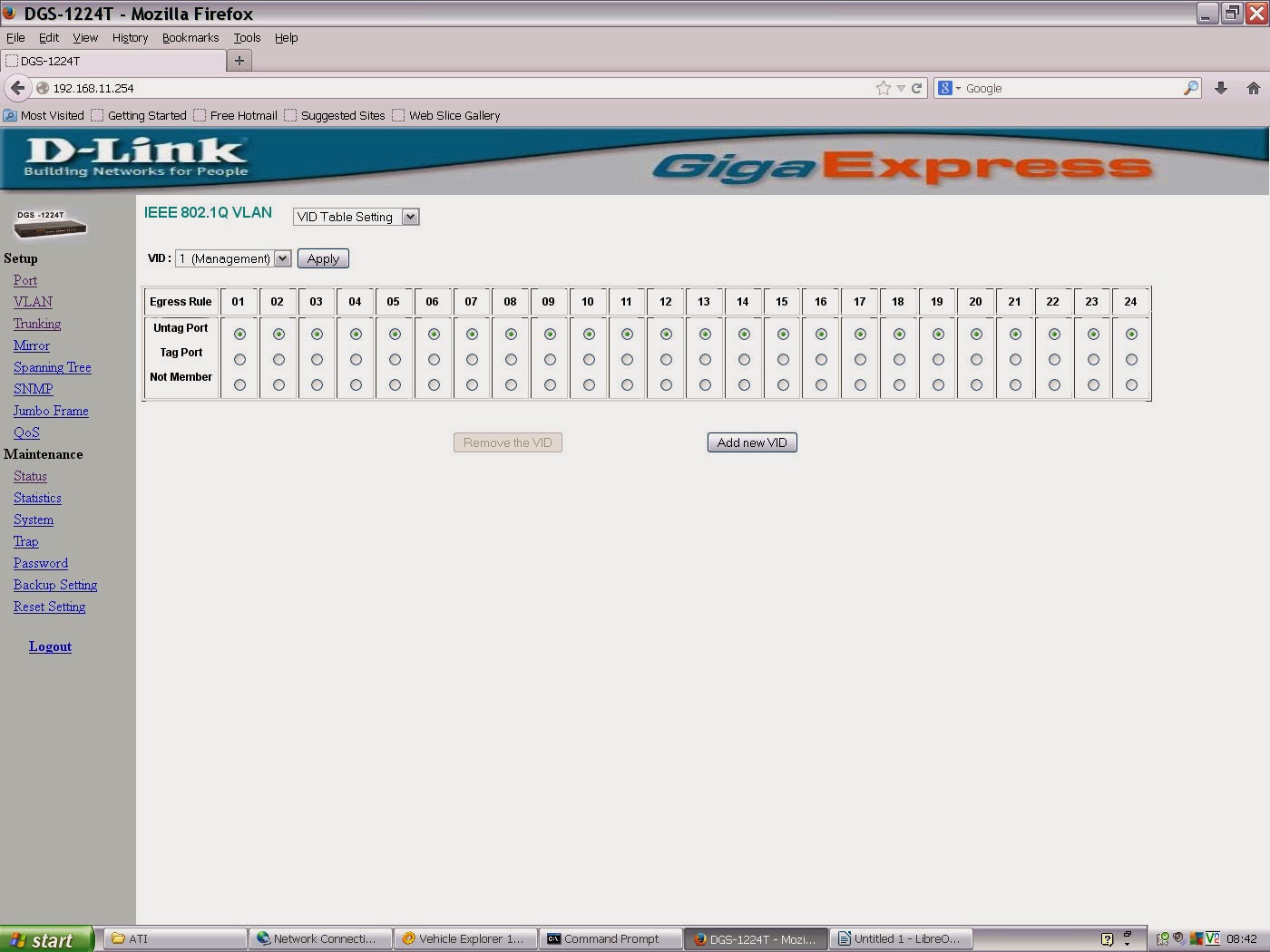


Friday, September 27, 2013
getting bttv cards working for zoneminder
Is the card PAL or NTSC? Cherck the crystals:
The crystal(s) are the small shiny canisters near the large decoder chip. For PAL, this is marked 28.xxxMHz (where xxx are three digits). For NTSC, the canister should bear 35.xxxMHz (again, the xxx are three digits).
The crystal(s) are the small shiny canisters near the large decoder chip. For PAL, this is marked 28.xxxMHz (where xxx are three digits). For NTSC, the canister should bear 35.xxxMHz (again, the xxx are three digits).
Sunday, August 11, 2013
dvb tuner adaptor numbers moving around mythtv
Initially the TBS (DVB_T2 card) loaded as adpators 0 and 1; sometimes (hotboot?) however the Hauppage cards would beat the TBS to it. this of course screws up tuner assignments in mythtv.
Although option 2 (see below) seemed less of a hack i only got option 1 to work:
Option 1: Blacklisting some of the drivers then activating later in boot:
edit this file;
nano /etc/modprobe.d/blacklist.conf
adding
#stop the Hauppauge S2 video card loading before
#TBS T2 card has assigned its adaptor numbers:
blacklist cx8800
blacklist cx8802
blacklist cx88-alsa
then add 'modprobe [the above listed modules]' to the file /etc/rc.local which will be activated a few moments after the TBS drivers have loaded
I have done back up copies of these two files: //server//home/markp/techincal/mythtv for future builds
This shows the names of the modules that are associated with pci hardware:
lspci -vnn
e.g. after compiling the TBS driver (see other posting):
04:00.0 Multimedia controller [0480]: Philips Semiconductors SAA7160 [1131:7160] (rev 03)
Subsystem: Device [6280:0011]
Flags: bus master, fast devsel, latency 0, IRQ 19
Memory at ef000000 (64-bit, non-prefetchable) [size=1M]
Capabilities: [40] MSI: Enable- Count=1/32 Maskable- 64bit+
Capabilities: [50] Express Endpoint, MSI 00
Capabilities: [74] Power Management version 2
Capabilities: [80] Vendor Specific Information: Len=50 <?>
Capabilities: [100] Vendor Specific Information: ID=0000 Rev=0 Len=088 <?>
Kernel driver in use: SAA716x TBS
Kernel modules: saa716x_tbs-dvb
http://ubuntuforums.org/showthread.php?t=1311795&page=2
Option 2: Would this work?
create a /etc/modprobe.d/options-dvb.conf file
# TBS6280 PCI-e DVB-t2
options saa716x_tbs-dvb adapter_nr=0,1
Nope, resulted in only Nova S2 being seen and adaptor no.s v strange
Although option 2 (see below) seemed less of a hack i only got option 1 to work:
Option 1: Blacklisting some of the drivers then activating later in boot:
edit this file;
nano /etc/modprobe.d/blacklist.conf
adding
#stop the Hauppauge S2 video card loading before
#TBS T2 card has assigned its adaptor numbers:
blacklist cx8800
blacklist cx8802
blacklist cx88-alsa
then add 'modprobe [the above listed modules]' to the file /etc/rc.local which will be activated a few moments after the TBS drivers have loaded
#!/bin/sh -e
# rc.local
# This script is executed at the end of each multiuser runlevel.
# Make sure that the script will "exit 0" on success or any other
# value on error.
# In order to enable or disable this script just change the execution
# bits.
# By default this script does nothing.
modprobe cx8800
modprobe cx8802
modprobe cx88-alsa


exit 0
I have done back up copies of these two files: //server//home/markp/techincal/mythtv for future builds
This shows the names of the modules that are associated with pci hardware:
lspci -vnn
e.g. after compiling the TBS driver (see other posting):
04:00.0 Multimedia controller [0480]: Philips Semiconductors SAA7160 [1131:7160] (rev 03)
Subsystem: Device [6280:0011]
Flags: bus master, fast devsel, latency 0, IRQ 19
Memory at ef000000 (64-bit, non-prefetchable) [size=1M]
Capabilities: [40] MSI: Enable- Count=1/32 Maskable- 64bit+
Capabilities: [50] Express Endpoint, MSI 00
Capabilities: [74] Power Management version 2
Capabilities: [80] Vendor Specific Information: Len=50 <?>
Capabilities: [100] Vendor Specific Information: ID=0000 Rev=0 Len=088 <?>
Kernel driver in use: SAA716x TBS
Kernel modules: saa716x_tbs-dvb
http://ubuntuforums.org/showthread.php?t=1311795&page=2
Option 2: Would this work?
create a /etc/modprobe.d/options-dvb.conf file
# TBS6280 PCI-e DVB-t2
options saa716x_tbs-dvb adapter_nr=0,1
Nope, resulted in only Nova S2 being seen and adaptor no.s v strange
Sunday, June 30, 2013
Monday, January 14, 2013
Scanning channels mythtv and mysql notes
One of the issues with (UK based) mythtv is the bewildering set of results you get when doing a channel scan with either freeview of freesat tuners. On freeview in particular now that signals from transmitters are being increased (where analogue is switched off) there is the likelihood that a full channel scan will result in at least two full duplicate sets of channels.
field 'channid' - It's confusing!
Explanation: with my 2x DBV-T and 2x DVB-S tuner setup I have (in theory) four tunings of BBC1, myth knows about all four because firstly, the T and S versions are distinguished by having different 'sourceid'. The 2 x BBC1 within the (eg) T tuner are distiguised by having different 'channid'. (these are made unique during tuning when the channel scanner tells you there is a duplication of channid, myths 'suggestion' of the alternative is how it get's set differently). Myth knows they are both BBC1 because they have the same (prescribed) 'serviceid' SID info comes from the channel scan. BBC1 on freesat and freeview will have different SIDs.
An added complication to this is that the DVB-T tuner can get multiple versions of BBC1 (etc) from different parts of the tuning freq (from weaker TXs further away). This is why the freqid field (unique to DVB-T) is helpful in eliminating those weaker versions of channels (the mysql 'DELETE FROM script above sorts this, but you must know which multiplexes your correct main TXer is using)
The above has resulted in a channel_change.sql text file (in markp/technical/mythtv) containing sql statements for channel configuration of a mythtv setup that contains both dvb-t and dbv-s tuners.
Note that this version of the file is for the Yorkshire (Emley Moor) tv transmitter. change regional BBC and ITV channel accordingly (BBC1 and ITV1).
Need to ensure freesat region variations match the freeview ones:
Which freesat ITV1 channel?? - Emley Moor, my freeview source transmits Yorkshire West, the freesat SID of which is 10160. i have noted some of the regional freesat stations in the file.
fresat SIDs listed here:
http://www.astra2.org/astra1n.html
To bring up the mysql command prompt for the mythtv database:
the statements file can be 'run' from a mysql prompt with the simple command 'source' eg:
The statement file didn't work at first and that was because the first statement which sets all channels to a high number and invisible was commented out. Amended it works well and produces a neat list of channels.
Two other issues now.
1. Am I better using rt-grabber (xmltv) for guide info? probably help if I would like to assign both freeview and freesat channels to the same channum, as some say is possible (the EPG looks much neater then)
2. Should I use same channum for freesat and freeview???
One solution for freeview is to scan only the 'tranports' that you want. This is an option in 'scan configuration' of mythbackend-setup.
but perhaps a neater one (with thanks to http://wiki.stocksy.co.uk/wiki/Tidy_up_MythTV_Channels ) is to always do the full channel scan then simply run this mysql statement, changing the freqid's to match your transmitter:
DELETE FROM channel WHERE (freqid NOT IN (41, 44, 47, 48, 51, 52) AND freqid IS NOT NULL);
You can get the freqid info from here: http://www.ukfree.tv
Determine which TV transmitter you're getting your signal from. My 6 digital multiplexes are: 41, 44, 47, 48, 51, 52
Liskeard update: muxes now: 21, 22, 25, 25, 27, 28, 30, 31, 37
Here's some notes re: the mythconverg mysql database:
The most pertinent table re: ensuring channels get setup up right is 'channel'
I have normally created separate 'sources' (FreeView EIT & FreeSat EIT) for the two types of broadcast (ie DVB-S and DVB-T). In the 'channel' table you can distinguish between DVB-S and T by looking at the sourceid field.
field 'channum' is the channel number used by mythtv in the epg and live TV etc.
Liskeard update: muxes now: 21, 22, 25, 25, 27, 28, 30, 31, 37
Here's some notes re: the mythconverg mysql database:
The most pertinent table re: ensuring channels get setup up right is 'channel'
I have normally created separate 'sources' (FreeView EIT & FreeSat EIT) for the two types of broadcast (ie DVB-S and DVB-T). In the 'channel' table you can distinguish between DVB-S and T by looking at the sourceid field.
UPDATE channel SET channum=101, visible=1, xmltvid="west-midlands.bbc1.bbc.co.uk" WHERE sourceid="2" AND serviceid="10301"; #'BBC 1 West Midlands';
field 'channum' is the channel number used by mythtv in the epg and live TV etc.
field 'channid' - It's confusing!
Explanation: with my 2x DBV-T and 2x DVB-S tuner setup I have (in theory) four tunings of BBC1, myth knows about all four because firstly, the T and S versions are distinguished by having different 'sourceid'. The 2 x BBC1 within the (eg) T tuner are distiguised by having different 'channid'. (these are made unique during tuning when the channel scanner tells you there is a duplication of channid, myths 'suggestion' of the alternative is how it get's set differently). Myth knows they are both BBC1 because they have the same (prescribed) 'serviceid' SID info comes from the channel scan. BBC1 on freesat and freeview will have different SIDs.
An added complication to this is that the DVB-T tuner can get multiple versions of BBC1 (etc) from different parts of the tuning freq (from weaker TXs further away). This is why the freqid field (unique to DVB-T) is helpful in eliminating those weaker versions of channels (the mysql 'DELETE FROM script above sorts this, but you must know which multiplexes your correct main TXer is using)
The above has resulted in a channel_change.sql text file (in markp/technical/mythtv) containing sql statements for channel configuration of a mythtv setup that contains both dvb-t and dbv-s tuners.
Note that this version of the file is for the Yorkshire (Emley Moor) tv transmitter. change regional BBC and ITV channel accordingly (BBC1 and ITV1).
Need to ensure freesat region variations match the freeview ones:
Which freesat ITV1 channel?? - Emley Moor, my freeview source transmits Yorkshire West, the freesat SID of which is 10160. i have noted some of the regional freesat stations in the file.
fresat SIDs listed here:
http://www.astra2.org/astra1n.html
To bring up the mysql command prompt for the mythtv database:
mysql -u root -p mythconverg;the statements file can be 'run' from a mysql prompt with the simple command 'source' eg:
mysql> source /path/to/file/channel_change.sqlThe statement file didn't work at first and that was because the first statement which sets all channels to a high number and invisible was commented out. Amended it works well and produces a neat list of channels.
Two other issues now.
1. Am I better using rt-grabber (xmltv) for guide info? probably help if I would like to assign both freeview and freesat channels to the same channum, as some say is possible (the EPG looks much neater then)
2. Should I use same channum for freesat and freeview???
Sunday, January 13, 2013
DVB-T2 in mytht tv using TBS6280
The TBS 6280 is a dual tuner DVB-T2 card, it has HD freeview ability.
To make it work:
Download the latest version of the driver from the TBS site
wget http://www.tbsdtv.com/download/document/common/tbs-linux-drivers_v130506.zip
mkdir tbs-linux-drivers_v130506
cd tbs-linux-drivers_v130506
unzip ../tbs-linux-drivers_v130506.zip
1 extract linux-tbs-drivers.tar.bz2 archive:
# tar xjvf linux-tbs-drivers.tar.bz22 go to driver package directory:
# cd linux-tbs-drivers3 depending on your kernel version and if the kernel is x86 or
x86_64 (check output of 'uname -a') do:
- for x86 kernel 3.x (x86 32 bit installations of kernel 3.x):
# ./v4l/tbs-x86_r3.sh- for x86 kernel 2.6.x (x86 32 bit installations of kernel 2.6.x):
# ./v4l/tbs-x86.sh- for any x86_64 kernel (x86 64 bit installations of Linux):
# ./v4l/tbs-x86_64.sh4 build and install the driver:
# make && make install5 reboot in order to load the newly installed driver:
# shutdown -r now6 after reboot check that the newly installed driver is loaded correctly:
# dmesg | grep frontendOR - follow the instructions from the v4l website:
http://linuxtv.org/wiki/index.php/TBS6280#Re-installing_after_a_kernel_upgradeDon't forget the driver will need building again if the kernel gets updated.
I'm going to prevent kernel updates automatically on this machine so that I don't find the TBS card isn't working one day: set that up using this guide:
http://askubuntu.com/questions/178324/how-to-skip-kernel-update
Subscribe to:
Posts (Atom)